SiteDash feature
Teams, workspaces, and permissions
Colleagues and client technical teams share one platform: client-owned workspaces, agency-owned workspaces, and permissions that match each role.
- One month free, full access
- No payment method to start
- Built for MODX agencies
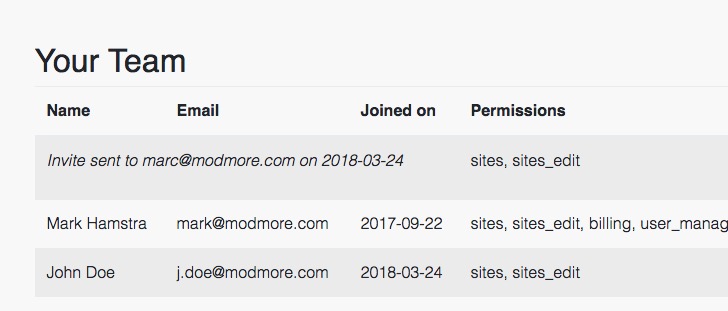
Teams inside a workspace
Each workspace is its own SiteDash account with its own plan, sites, and invoice. You can invite unlimited colleagues into that workspace and grant permissions individually. Everyone gets their own login and can enable MFA.
Alerts and emails follow the same rules: no access to a site means no alerts for that site, and users without billing rights will not receive invoice mail.
Workspaces are separate accounts, one login for all of them
A workspace is not a folder inside your agency account. It is a fully separate billing relationship: its own subscription, site limits, and payment.
That model works well when a larger client has an in-house technical team but still wants your agency on the tools. The client creates (or owns) their workspace, pays the bill, and invites your people as users. You keep your agency workspace for your own estate, then switch between workspaces from the same SiteDash login without juggling passwords.
When you invite someone, you choose which capabilities they need. Permissions can be mixed and matched per user:
- View sites — see dashboards, checks, and reports for sites they can access.
- Add/edit/delete sites — connect or remove sites and change site settings.
- Search users across sites — use cross-site manager user search (where the client allows it).
- Billing — view invoices, payment methods, and plan changes.
- User management — invite, edit, or remove workspace members and their permissions.
For agencies with several in-house teams, enable Restricted Mode in user management. By default, anyone with view sites can see every site in the workspace.
With Restricted Mode on, access is narrowed through site labels. Assign labels to users and to sites; a user only sees sites that share at least one of their labels. A common pattern is one label per department or account manager. Users with add/edit/delete sites still reach all sites so they can manage labels and connections.
Learn more about: Monitoring · Security · Remote management · Request signing · Action Center · All features
Try SiteDash with a free one-month trial, with all features and no payment method required to get started.